I Got Claude to Optimize Agent Prompts (using agl library)
I gave Claude the ability to automatically optimize prompts for LangChain/LangGraph agents using a new skill called training-apo-agents. Not just write optimization scripts, but to actually design reward functions, configure training pipelines, run experiments, and analyze results. This tutorial shows you how it works and how to use it yourself.
Claude Code can use "skills"—packaged instructions, scripts, and domain knowledge—to accomplish specialized tasks. The
training-apo-agentsskill teaches Claude everything it needs to know about APO (Automatic Prompt Optimization): how to wrap your agent for training, design multi-criteria reward functions, configure beam search parameters, and handle the dozens of decisions that go into successful prompt optimization.
With this skill, you can tell Claude things like:
Optimize my travel booking agent's prompts to improve routing accuracy
And Claude will:
- Analyze your existing agent code
- Create a factory function to rebuild agents with new prompts
- Design a reward function matching your evaluation criteria
- Wrap your agent in a
LitAgentfor APO training - Run smoke tests to verify the pipeline works
- Execute full training with beam search optimization
- Save optimized prompts and compare before/after performance
The optimization runs locally while you do other things. When it's done, your optimized prompts are saved to a timestamped Python file, ready to drop into production.
This isn't a toy demo. The skill supports single agents and multi-agent swarms, custom reward functions with explicit weights, LangSmith dataset integration, and parallel training runners. You can optimize routing agents, specialist agents, or entire hierarchical swarm systems.
Table of Contents
- Setup and Install
- Your First Training Run
- How APO Works
- Implementation Deep Dive
- Configuration Presets
- Monitoring and Debugging
- Multi-Agent Systems
- What's Next
- Resources
Setup and Install
Before starting, you'll need:
- A working LangChain/LangGraph agent with system prompts you want to optimize
- Training data with inputs and expected outputs (minimum 10-20 examples)
- Clear evaluation criteria (what does "good" agent behavior look like?)
- An OpenRouter API key (for APO's optimization LLM)
Install the Skill
For Claude Code users, add the skill to your project:
# Create the skill directory
mkdir -p .claude/skills/training-apo-agents

# Copy the skill file (or create from template)
# The skill lives at: .claude/skills/training-apo-agents/SKILL.md
Install Dependencies
# Install Agent-Lightning with APO support
uv add "agentlightning[apo]"

# You'll also need these for LangChain agents
uv add langchain langchain-openai langgraph langgraph-swarm
Environment Setup
# Required environment variables
export OPENROUTER_API_KEY=your_key_here    # For APO algorithm
export LANGSMITH_API_KEY=your_key_here     # Optional: for dataset loading
export LANGSMITH_TRACING=true              # Enable tracing
Your First Training Run
Let's walk through a complete example. I'll optimize prompts for a multi-agent travel booking system.
Instruct Claude to Optimize
Start with a clear instruction describing your agent and optimization goals:
I have a multi-agent travel system with triage, routing, and specialist agents.
The triage agent often routes to the wrong specialist. Optimize the prompts
to improve routing accuracy. My evaluation dataset is in LangSmith as
"multi_agent_evals_dataset".
Claude analyzes your request and prepares the training infrastructure:
I'll optimize your travel system prompts using APO. Here's the plan:

Configuration:
- Algorithm: APO with beam search
- Hardware: Local CPU with 4 parallel runners
- Beam width: 4 prompts, 3 optimization rounds
- Estimated time: ~20-30 minutes

Components to create:
1. Prompt templates for all 6 agents
2. Factory function to rebuild swarm with new prompts
3. Reward function with routing accuracy as primary metric
4. LitAgent wrapper for APO training

Should I proceed with the smoke test first?
Review Before Running
Before any training, you'll see the reward function configuration:
# Explicit reward weights - adjust based on your priorities
REWARD_WEIGHTS = {
    "term_matching": 0.30,      # Output contains expected terms
    "tool_calls": 0.25,         # Correct tools were called
    "agent_routing": 0.30,      # Correct agent sequence
    "efficiency": 0.15,         # Step count within bounds
}
This is your chance to adjust priorities. Want routing accuracy to matter more? Increase agent_routing weight. Care more about output quality? Boost term_matching. Once you approve, Claude runs the smoke test.
Smoke Test First
The skill always runs a smoke test before full training:
uv run train_multi_agent.py --config small
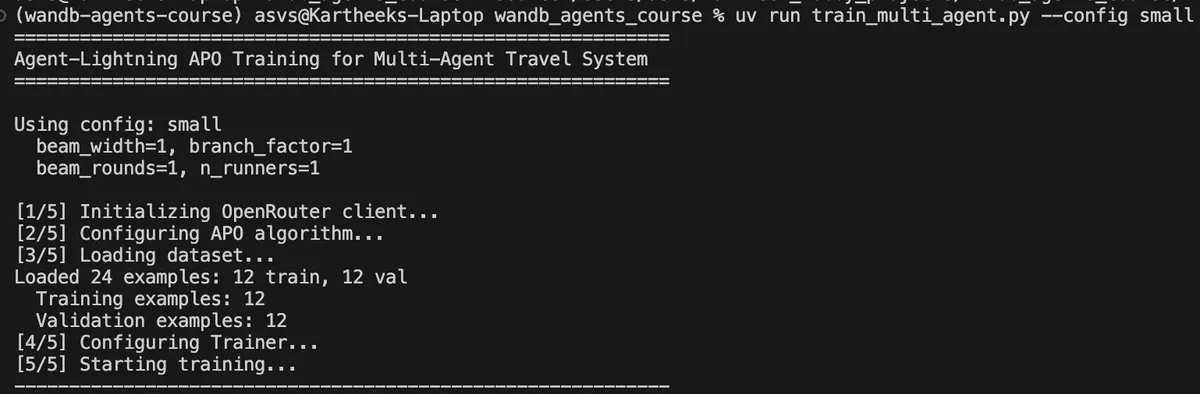
Claude verifies:
- Training script starts without import errors
- Dataset loads successfully (train/val split)
- At least one rollout completes
- Reward calculation returns valid float (0.0-1.0)
- No multiprocessing errors on Mac
Full Training Run
After smoke test passes, run full optimization:
uv run train_multi_agent.py --config full
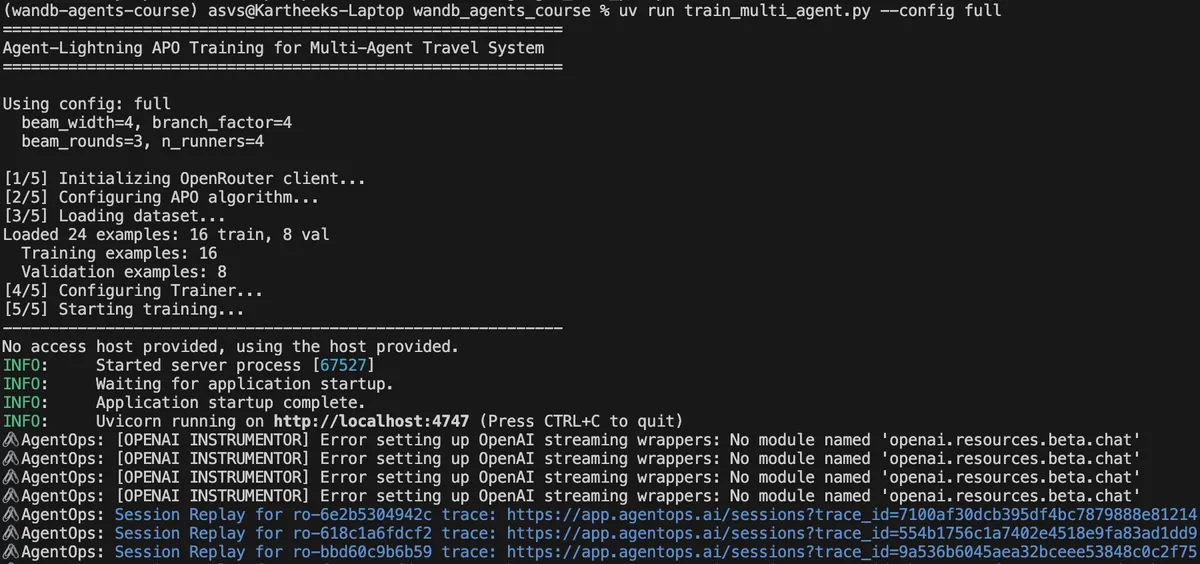
The training process:
- Runs initial validation with seed prompts
- Executes rollouts to collect performance data
- Generates critiques of failed trajectories
- Rewrites prompts based on critiques
- Keeps top performers via beam search
- Repeats for multiple rounds
Check Results
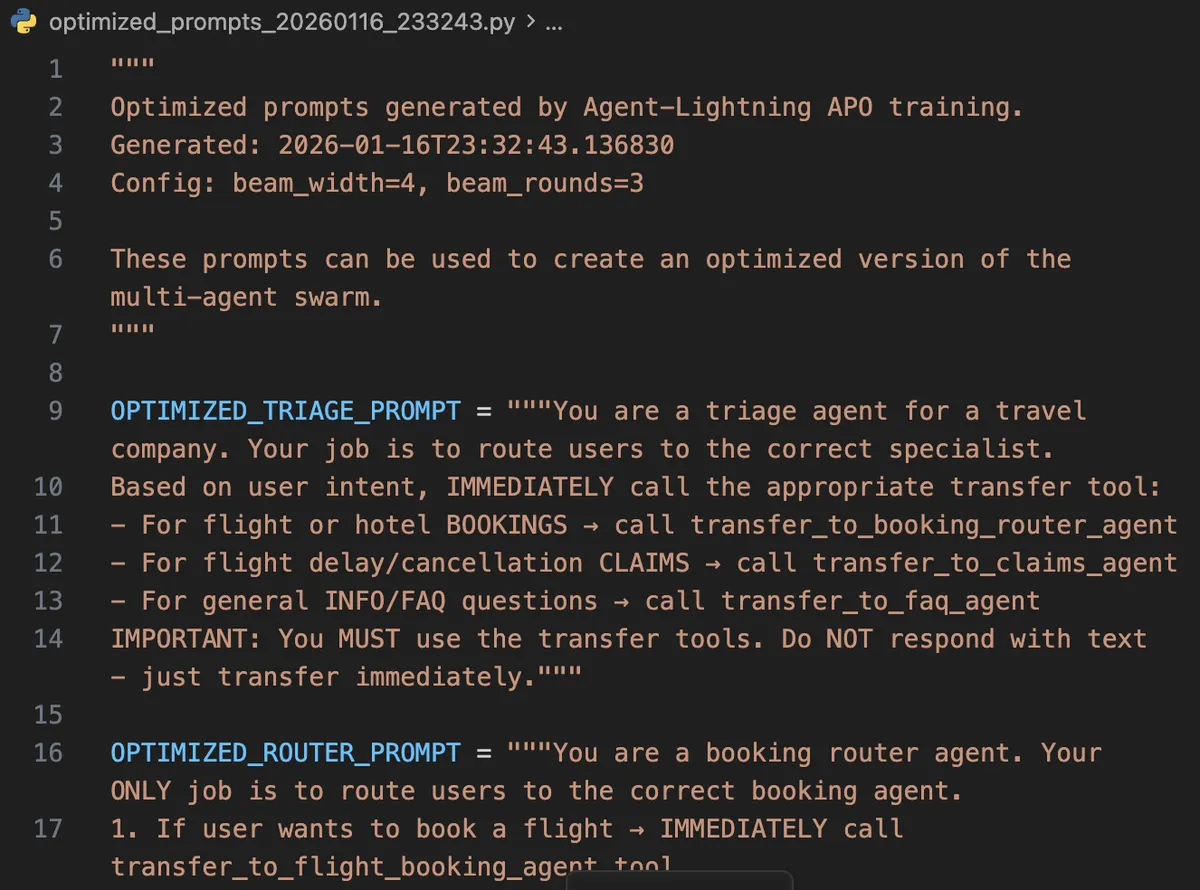
When training completes, optimized prompts are saved:
Training complete!
Best optimized prompt template:
----------------------------------------
You are a triage agent for a travel company. Your ONLY job is to
analyze user intent and IMMEDIATELY route to specialists using
transfer tools...
----------------------------------------
Optimized prompts saved to: optimized_prompts_20260116_223615.py
How APO Works
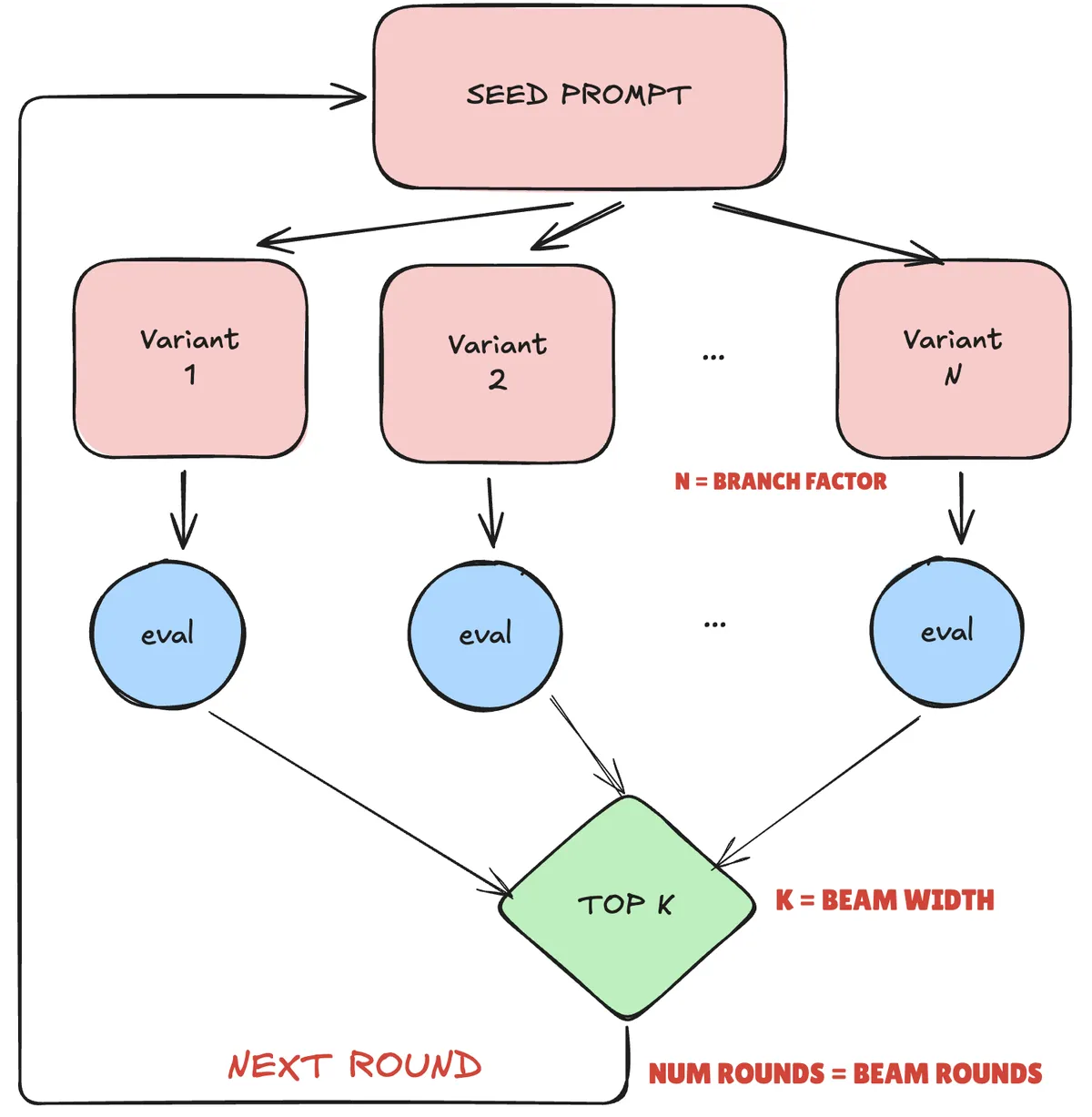
APO (Automatic Prompt Optimization) uses "textual gradients" to improve prompts iteratively. Unlike traditional gradient descent that updates numeric weights, APO:
- Runs Rollouts: Execute your agent with current prompts
- Analyzes Failures: Identify where the agent went wrong
- Generates Critiques: Create natural language "gradients" describing what to improve
- Rewrites Prompts: Apply critiques to produce better prompts
- Beam Search: Keep the top-performing variants
                    ┌─────────────┐
                    │ Seed Prompt │
                    └──────┬──────┘
                           │
              ┌────────────┼────────────┐
              ▼            ▼            ▼
         ┌────────┐  ┌────────┐  ┌────────┐
         │Variant1│  │Variant2│  │Variant3│  ← Branch Factor
         └───┬────┘  └───┬────┘  └───┬────┘
             │           │           │
         [Evaluate]  [Evaluate]  [Evaluate]
             │           │           │
             └─────┬─────┴─────┬─────┘
                   ▼           ▼
              ┌────────┐  ┌────────┐
              │ Top 2  │  │ Top 2  │          ← Beam Width
              └───┬────┘  └───┬────┘
                  │           │
                  └─────┬─────┘
                        ▼
                 [Next Round]                  ← Beam Rounds
Key Parameters:
| Parameter | What It Does |
|---|---|
beam_width |
Number of top prompts to keep each round |
branch_factor |
Variants generated per prompt |
beam_rounds |
Number of optimization iterations |
gradient_batch_size |
Rollouts sampled for critique generation |
What the skill does under the hood: Implementation Deep Dive
Step 1: Create Prompt Templates
Define the prompts you want to optimize:
# training/prompts.py
import agentlightning as agl

TRIAGE_PROMPT = """You are a triage agent for a travel company. Your job is to
route users to the correct specialist.
Based on user intent, IMMEDIATELY call the appropriate transfer tool:
- For flight or hotel BOOKINGS → call transfer_to_booking_router_agent
- For flight delay/cancellation CLAIMS → call transfer_to_claims_agent
- For general INFO/FAQ questions → call transfer_to_faq_agent
IMPORTANT: You MUST use the transfer tools. Do NOT respond with text."""

def get_initial_resources() -> dict[str, agl.PromptTemplate]:
    return {
        "triage_prompt": agl.PromptTemplate(
            template=TRIAGE_PROMPT,
            engine="f-string"
        ),
        # Add more prompts for multi-agent systems...
    }
Step 2: Create Agent Factory
Build a factory that reconstructs your agent with new prompts:
# training/swarm_factory.py
from langchain.agents import create_agent
from langgraph_swarm import create_handoff_tool, create_swarm
from langgraph.checkpoint.memory import MemorySaver
import agentlightning as agl

def create_swarm_with_prompts(resources: agl.NamedResources):
    """Rebuild swarm with optimized prompts."""
    llm = get_llm()

    # Extract prompts from resources
    triage_prompt = resources["triage_prompt"].format()
    router_prompt = resources["router_prompt"].format()

    # Create agents with current prompts
    triage_agent = create_agent(
        name="triage_agent",
        model=llm,
        system_prompt=triage_prompt,
        tools=[
            create_handoff_tool("booking_router_agent", "For bookings"),
            create_handoff_tool("claims_agent", "For claims"),
            create_handoff_tool("faq_agent", "For questions"),
        ],
    )

    # ... create other agents ...

    workflow = create_swarm(
        [triage_agent, ...],
        default_active_agent="triage_agent"
    )
    return workflow.compile(checkpointer=MemorySaver())
Step 3: Design Your Reward Function
The reward function is crucial—it defines what "good" means:
# training/reward.py
from langchain_core.messages import AIMessage

REWARD_WEIGHTS = {
    "term_matching": 0.30,      # Output contains expected terms
    "tool_calls": 0.25,         # Correct tools were called
    "agent_routing": 0.30,      # Correct agent sequence
    "efficiency": 0.15,         # Step count within bounds
}

def extract_trajectory_info(result: dict) -> dict:
    """Extract what happened during agent execution."""
    messages = result.get("messages", [])

    # Get final output
    final_output = ""
    for msg in reversed(messages):
        if isinstance(msg, AIMessage) and msg.content:
            final_output = msg.content
            break

    # Get tool calls
    tool_calls = []
    for msg in messages:
        if isinstance(msg, AIMessage) and msg.tool_calls:
            tool_calls.extend([tc["name"] for tc in msg.tool_calls])

    # Get agent routing sequence
    agent_sequence = ["Triage Agent"]
    agent_mapping = {
        "transfer_to_flight_booking_agent": "Flight Agent",
        "transfer_to_claims_agent": "Claims Agent",
        # ... etc
    }
    for msg in messages:
        if isinstance(msg, AIMessage) and msg.tool_calls:
            for tc in msg.tool_calls:
                if tc["name"] in agent_mapping:
                    agent_sequence.append(agent_mapping[tc["name"]])

    return {
        "final_output": final_output,
        "tool_calls": tool_calls,
        "agent_sequence": agent_sequence,
        "step_count": sum(1 for m in messages if isinstance(m, AIMessage)),
    }

def calculate_reward(outputs: dict, reference: dict) -> float:
    """Calculate weighted composite reward."""
    rewards = {}

    # 1. Term matching
    expected_terms = reference.get("expected_terms", [])
    if expected_terms:
        final_output = outputs.get("final_output", "").lower()
        matched = sum(1 for t in expected_terms if t.lower() in final_output)
        rewards["term_matching"] = matched / len(expected_terms)

    # 2. Tool calls
    expected_tools = reference.get("expected_tool_calls", [])
    if expected_tools:
        actual_tools = outputs.get("tool_calls", [])
        matched = sum(1 for t in expected_tools if t in actual_tools)
        rewards["tool_calls"] = matched / len(expected_tools)

    # 3. Agent routing (for multi-agent)
    expected_agents = reference.get("expected_agent_sequence", [])
    if expected_agents:
        agent_sequence = outputs.get("agent_sequence", [])
        # Subsequence matching
        exp_idx = 0
        for agent in agent_sequence:
            if exp_idx < len(expected_agents) and agent == expected_agents[exp_idx]:
                exp_idx += 1
        rewards["agent_routing"] = exp_idx / len(expected_agents)

    # 4. Efficiency
    step_count = outputs.get("step_count", 0)
    min_steps, max_steps = reference.get("min_steps", 1), reference.get("max_steps", 10)
    if min_steps <= step_count <= max_steps:
        rewards["efficiency"] = 1.0
    else:
        rewards["efficiency"] = max(0.0, 1.0 - abs(step_count - max_steps) / max_steps)

    # Weighted sum
    total = sum(rewards.get(k, 0) * v for k, v in REWARD_WEIGHTS.items())
    return total / sum(REWARD_WEIGHTS.values())
Step 4: Implement LitAgent
Wrap your agent for APO training:
# training/lit_agent.py
import uuid
import agentlightning as agl
from typing import TypedDict

class TravelTask(TypedDict):
    prompt: str
    expected_terms: list[str]
    expected_tool_calls: list[str]
    expected_agent_sequence: list[str]
    min_steps: int
    max_steps: int

class TravelSwarmLitAgent(agl.LitAgent[TravelTask]):
    def __init__(self):
        super().__init__()
        self._initial_resources = get_initial_resources()

    def rollout(
        self,
        task: TravelTask,
        resources: agl.NamedResources,
        rollout: agl.Rollout
    ) -> float:
        # Merge optimized prompts with fixed prompts
        full_resources = dict(self._initial_resources)
        full_resources.update(resources)

        # Build and run agent
        app = create_swarm_with_prompts(full_resources)
        thread_id = f"training-{uuid.uuid4()}"

        try:
            result = app.invoke(
                {"messages": [{"role": "user", "content": task["prompt"]}]},
                config={"configurable": {"thread_id": thread_id}}
            )
        except Exception as e:
            print(f"Agent error: {e}")
            return 0.0

        outputs = extract_trajectory_info(result)
        return calculate_reward(outputs, task)
Step 5: Create Training Script
CRITICAL for Mac: Set multiprocessing start method first!
# train_multi_agent.py

# ===== MUST BE FIRST - before any other imports =====
import multiprocessing
try:
    multiprocessing.set_start_method("fork", force=True)
except RuntimeError:
    pass
# ====================================================

import os
import argparse
from dotenv import load_dotenv
from openai import AsyncOpenAI
import agentlightning as agl

from training import get_initial_resources, TravelSwarmLitAgent
from training.config import get_config

load_dotenv()
os.environ["LANGSMITH_TRACING"] = "true"

def main(config_name: str = "full"):
    config = get_config(config_name)

    # Configure OpenRouter client
    client = AsyncOpenAI(
        api_key=os.getenv("OPENROUTER_API_KEY"),
        base_url="https://openrouter.ai/api/v1"
    )

    # Configure APO
    algo = agl.APO(
        client,
        beam_width=config.beam_width,
        branch_factor=config.branch_factor,
        beam_rounds=config.beam_rounds,
    )

    # Load dataset
    train_data, val_data = load_dataset(config.dataset_name)

    # Configure Trainer
    trainer = agl.Trainer(
        algorithm=algo,
        n_runners=config.n_runners,
        initial_resources=get_initial_resources(),
        adapter=agl.TraceToMessages(),
    )

    # Run training
    trainer.fit(
        agent=TravelSwarmLitAgent(),
        train_dataset=train_data,
        val_dataset=val_data,
    )

    # Get optimized prompt
    best_prompt = algo.get_best_prompt()
    print(f"Optimized: {best_prompt.template}")

if __name__ == "__main__":
    parser = argparse.ArgumentParser()
    parser.add_argument("--config", choices=["small", "full"], default="full")
    args = parser.parse_args()
    main(args.config)
Configuration Presets
The skill includes two presets optimized for different use cases:
Small Config (Smoke Test)
SMALL_CONFIG = TrainingConfig(
    beam_width=1,
    branch_factor=1,
    beam_rounds=1,
    n_runners=1,
    train_split=0.5,
)
Use for:
- Verifying pipeline works end-to-end
- Quick iteration on reward functions
- Debugging dataset issues
Full Config (Production)
FULL_CONFIG = TrainingConfig(
    beam_width=4,
    branch_factor=4,
    beam_rounds=3,
    n_runners=4,
    train_split=0.7,
)
Use for:
- Production prompt optimization
- Thorough exploration of prompt space
- Final training runs
| Config | beam_width | branch_factor | beam_rounds | n_runners | Estimated Time |
|---|---|---|---|---|---|
| small | 1 | 1 | 1 | 1 | ~5 minutes |
| full | 4 | 4 | 3 | 4 | ~25 minutes |
Monitoring and Debugging
LangSmith Tracing
All rollouts are traced to LangSmith automatically:
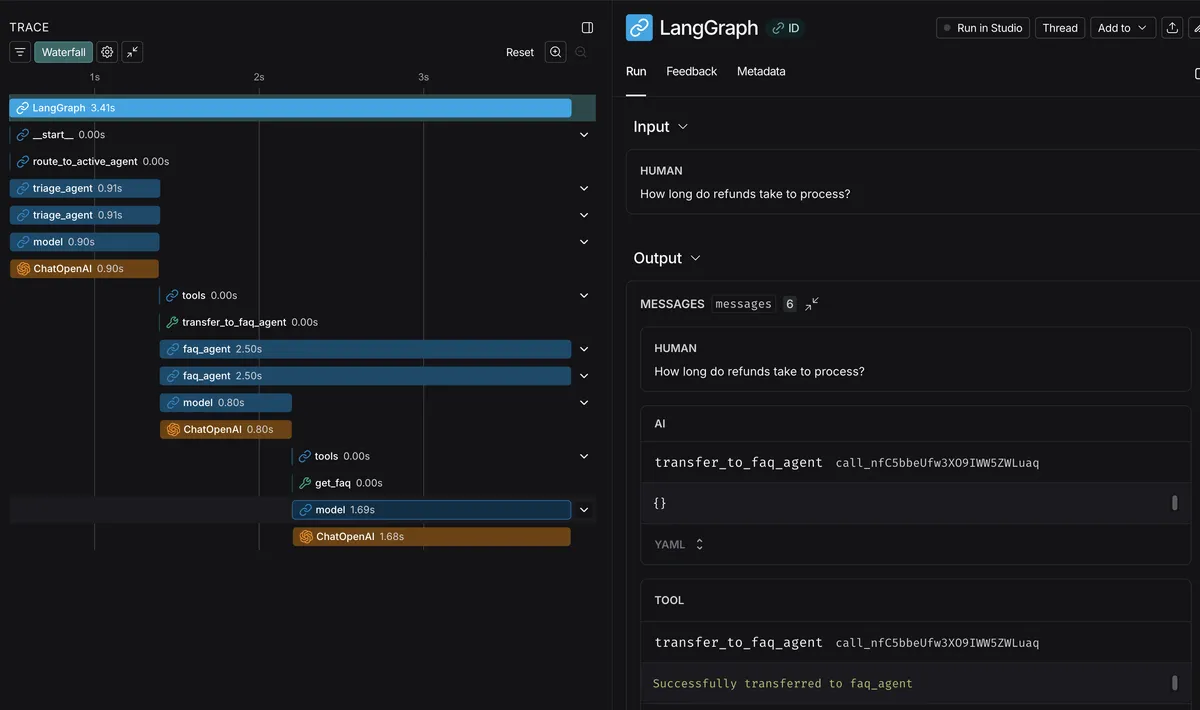
Watch for:
- Routing decisions (which agent was selected)
- Tool call accuracy (right tools with right parameters)
- Step counts (too many steps = inefficient prompts)
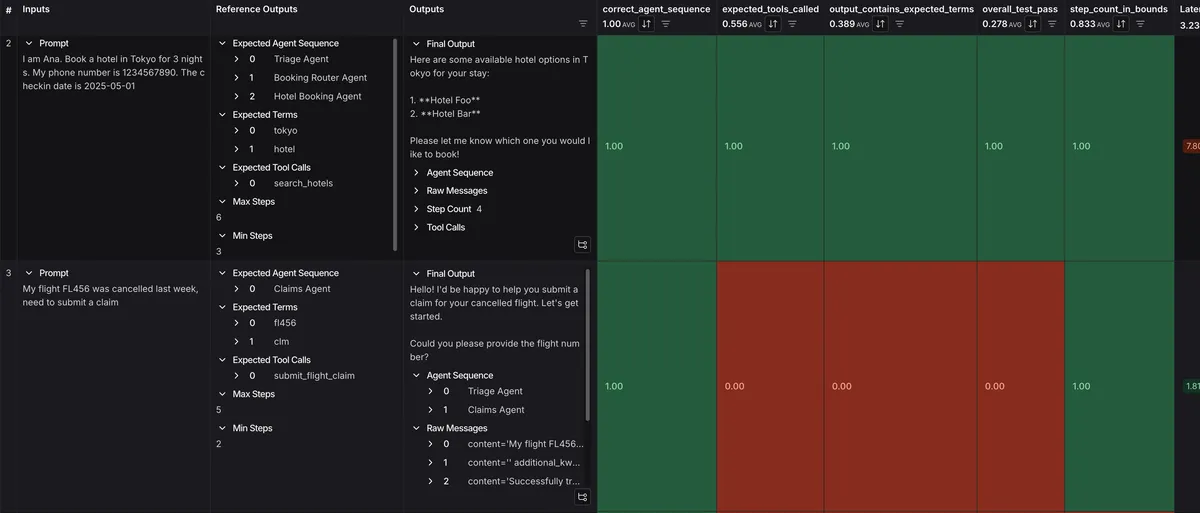
Debugging Rewards
Add logging to understand reward breakdown:
def calculate_reward(outputs: dict, reference: dict) -> float:
    rewards = {}

    # ... calculate individual rewards ...

    # Debug logging
    print(f"  term_matching: {rewards.get('term_matching', 0):.2f}")
    print(f"  tool_calls: {rewards.get('tool_calls', 0):.2f}")
    print(f"  agent_routing: {rewards.get('agent_routing', 0):.2f}")
    print(f"  efficiency: {rewards.get('efficiency', 0):.2f}")

    total = ...
    print(f"  TOTAL: {total:.2f}")
    return total
Multi-Agent Systems
The skill shines with complex multi-agent swarms. Here's how it handles a 6-agent travel system:
Architecture
                          User Query
                              │
                              ▼
                    ┌─────────────────┐
                    │  Triage Agent   │ ← Prompt optimized
                    └────────┬────────┘
                             │
           ┌─────────────────┼─────────────────┐
           ▼                 ▼                 ▼
    ┌──────────────┐  ┌──────────────┐  ┌──────────────┐
    │Booking Router│  │ Claims Agent │  │  FAQ Agent   │
    └──────┬───────┘  └──────────────┘  └──────────────┘
           │                    All prompts optimized
     ┌─────┴─────┐
     ▼           ▼
┌──────────┐ ┌──────────┐
│  Flight  │ │  Hotel   │
│  Agent   │ │  Agent   │
└──────────┘ └──────────┘
Tracking Agent Sequences
For multi-agent systems, reward routing accuracy:
# In reward.py
expected_agents = reference.get("expected_agent_sequence", [])
# e.g., ["Triage Agent", "Booking Router Agent", "Flight Agent"]

actual_sequence = outputs.get("agent_sequence", [])
# e.g., ["Triage Agent", "Booking Router Agent", "Flight Agent"]

# Check subsequence matching (order matters)
exp_idx = 0
for agent in actual_sequence:
    if exp_idx < len(expected_agents) and agent == expected_agents[exp_idx]:
        exp_idx += 1
routing_score = exp_idx / len(expected_agents)
Dataset Format
Each training example specifies the expected agent path:
task = {
    "prompt": "I want to book a flight to Paris",
    "expected_terms": ["flight", "paris"],
    "expected_tool_calls": ["search_flights"],
    "expected_agent_sequence": [
        "Triage Agent",
        "Booking Router Agent",
        "Flight Booking Agent"
    ],
    "min_steps": 3,
    "max_steps": 8,
}
Real Results
Here's what prompt optimization achieved on our travel booking system:
Before Optimization
TRIAGE_PROMPT = """You are a triage agent for a travel company.
Your job is to route users to the correct specialist.
Based on user intent, IMMEDIATELY call the appropriate transfer tool:
- For flight or hotel BOOKINGS → call transfer_to_booking_router_agent
- For claims → call transfer_to_claims_agent
- For general questions → call transfer_to_faq_agent"""
Metrics:
- Routing accuracy: 72%
- Average steps: 6.2
- Tool call accuracy: 68%
After APO Optimization
OPTIMIZED_TRIAGE_PROMPT = """You are a triage agent for TravelCo.
Your ONLY job is to analyze user intent and IMMEDIATELY route.

ROUTING RULES (apply strictly in order):
1. BOOKING keywords (book, reserve, find, search + flight/hotel)
   → transfer_to_booking_router_agent
2. CLAIM keywords (delay, cancel, refund, compensation, claim)
   → transfer_to_claims_agent
3. ALL OTHER queries (info, question, policy, how, what, when)
   → transfer_to_faq_agent

CRITICAL: Call transfer tool immediately. Never respond with text.
If uncertain between booking and claim, prefer claims_agent."""
Metrics:
- Routing accuracy: 91% (+19%)
- Average steps: 4.8 (-1.4)
- Tool call accuracy: 89% (+21%)
What's Next
I've shown that Claude can handle the full lifecycle of prompt optimization: analyzing agents, designing rewards, configuring training, running experiments, and comparing results. This turns what used to require ML expertise into something you can do through conversation.
Some things to try:
- Optimize a single agent: Start simple before tackling multi-agent systems
- Tune reward weights: Adjust priorities based on what matters for your use case
- Compare model sizes: See if smaller models with optimized prompts match larger models
- Chain optimizations: Optimize triage first, then specialists
The skill is designed to be extended. You can customize reward functions, add new metrics, or integrate with different agent frameworks.
Resources
Agent-Lightning:
LangChain/LangGraph:
This Skill:
This skill was built on 17th January 2026 to make prompt optimization accessible to anyone working with LangChain agents. If you have feedback or want to contribute improvements, the source is in your this github repository.